How to play FLAC files on an iPhone
iOS has decoded FLAC since iOS 11. What it will not do is let you put one in the Music app. Here is the way round it, and why no conversion is needed.

Why your FLAC files will not go on the phone
The confusion here is worth clearing up first, because it sends people to the wrong solution: the iPhone can play FLAC perfectly well. Core Audio has decoded it for years, Files will preview one, and any app that reads its own files can play it. What cannot handle FLAC is the sync path — the Music app’s library, and iTunes or Finder feeding it. Drop a FLAC into that and you are offered a conversion to ALAC or AAC, or nothing happens at all.
So the usual advice — "convert everything to ALAC" — solves a problem you do not have, at the cost of a second copy of your library and a re-encode you cannot undo cleanly. ALAC is lossless too, so the audio survives; the tags, the embedded art and the disc layout often do not survive the round trip, and you now have two libraries to keep in step.
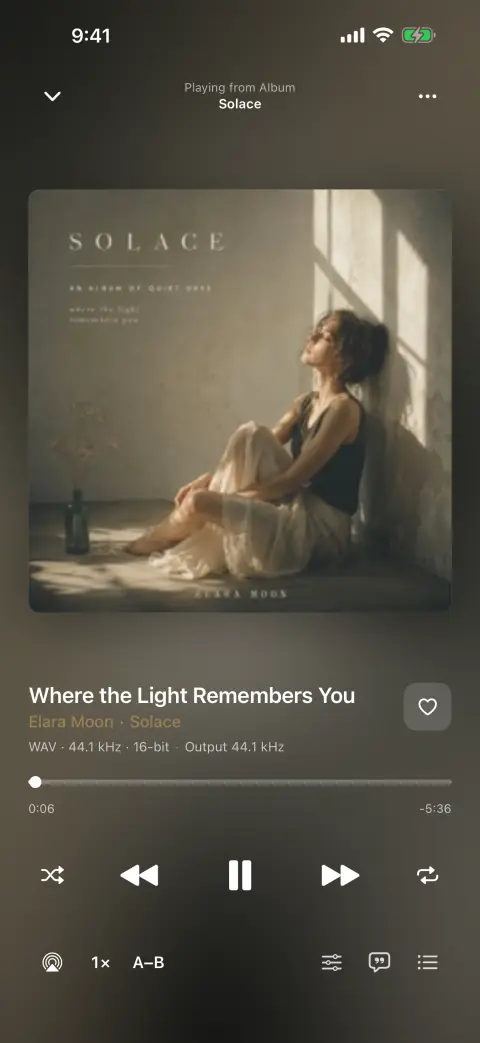
The other route is simply a player that reads files. It keeps the FLAC as a FLAC, reads the Vorbis comments and the picture block the file already carries, and never involves the Music app at all. That is what bMusic does, and the rest of this page is the five minutes it takes.
Step by step
Playing a FLAC on an iPhone, start to finish
- 01
Put bMusic on the phone
It needs iOS 18.0 or later and runs on iPhone and iPad from the same download. Every part of it works for 15 days from the day you install it, which is more than enough to check your own files play.
- 02
Open the transfer page on the computer holding the files
On the phone, choose Import from Wi-Fi. On the computer, open the address it shows and point the phone’s camera at the code on screen. The two are then talking directly over your own network — there is nothing to install on the computer, and no cable.
- 03
Drag the FLAC files into the browser
A whole album, a whole artist folder, or one track. They copy across as they are: no conversion, no re-encode, no "optimised" second copy. Large lossless files take as long as your Wi-Fi takes and nothing more.
- 04
Let the library build itself
bMusic reads the tags out of each FLAC — artist, album, track number, disc number, year, genre — and files it under Music/Artist/Album. Embedded cover art comes through with it. Nothing has to be typed in.
- 05
Play it
Gapless between tracks, so a live album or a beat-matched record runs the way it was cut. The ten-band equaliser, the sleep timer, AirPlay, Bluetooth and the lock-screen controls all work the way they do in any other player.
If the files are not on a computer, the same library takes them from AirDrop, the Files app, another app’s share sheet, a direct link, or your own WebDAV server.
What this gets you that converting does not
- One copy of the library
- The file on the phone is the file you had. Nothing to re-sync when you retag something, and no second "iPhone version" of the album drifting away from the original.
- The tags you spent time on
- Artist, album artist, disc and track numbers, year, genre and embedded art are read from the FLAC itself. Compilations stay compilations and multi-disc sets keep their disc numbers.
- The rest of your formats too
- The same library holds MP3, AAC, M4A, ALAC, FLAC, OPUS, WAV, AIFF side by side. A collection that is half FLAC and half MP3 does not need sorting out first.
- Files you can take back out
- The same Wi-Fi page lists the library and downloads any song back to the computer’s browser. Nothing here is a one-way import.
FAQ
FLAC on iPhone: the usual questions
Does the iPhone support FLAC natively?
Should I convert my FLAC files to ALAC instead?
Will lossless files fill up my phone?
Does lossless survive Bluetooth headphones?
Can I still use Apple Music?
Other guides
Move a library off Android
Switch to iOS moves your photos and messages. The folder of music files is the part it leaves behind.
Read the guidePut a ripped CD on an iPhone
You ripped it losslessly on purpose. Getting it onto the phone should not undo that.
Read the guideWhen streaming takes a song away
The album is greyed out and the playlist has a hole in it. Owning the file is the only fix that lasts.
Read the guideYour own music in the car
A tunnel, a data cap or a rural road, and the streaming app stalls. Files on the phone never do.
Read the guideLyrics for your own files
Lyrics apps look a song up in a catalogue. The rip, the bootleg and the demo are not in it — so the words have to come from the recording.
Read the guideKaraoke and practising a part
Take the voice out, move the key, loop the bar you keep missing and slow it down — on a song you own, on the phone.
Read the guideBring your own music
Every part of bMusic works for 15 days from the day you install it, with nothing held back. Send one album across and hear it on your own headphones.
iPhone, iPad and Mac · iOS 18.0 or later · MP3, AAC, M4A, ALAC, FLAC, OPUS, WAV, AIFF