
For iPhone and iPad · iOS 18.0 or later

The offline music player for files you own.

Play FLAC, MP3, ALAC, AAC, Opus, WAV and more on iPhone, iPad and Mac. Import by Wi-Fi, AirDrop, Files, another app or your NAS. Your library stays under your control, works without a signal and never requires a bMusic account.

  • Works fully offline
  • No bMusic account
  • Import without iTunes
  • iPhone, iPad and Mac
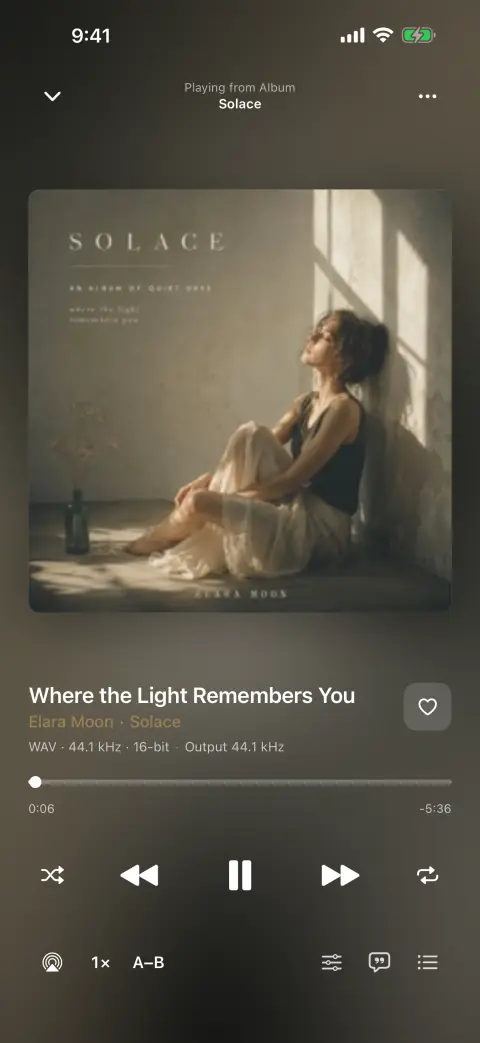
The bMusic player, showing cover art, the progress bar and playback controls
8audio formats, FLAC included
15days free, nothing held back
0accounts to create
12interface languages

Core features

Import, organize and play your own music

The essentials are straightforward: get files onto the device, keep the library organized, and play them the way you expect.

Importing

Import music without iTunes

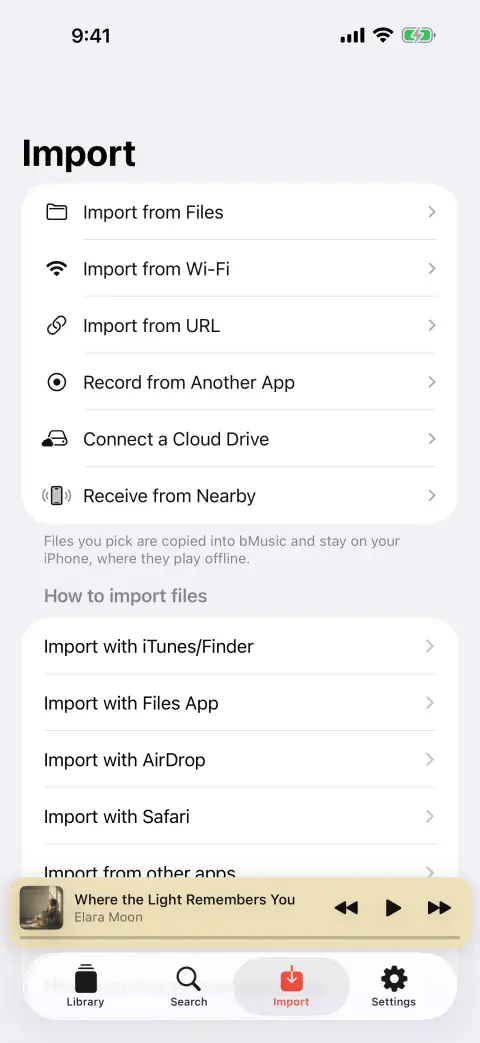
Open a page on your computer, read the code off the phone with the camera, and drag files into the browser — nothing to install on the computer. Or use AirDrop, the Files app, Finder file sharing, another app’s share sheet, or a direct link.

  • Wi-Fi transfer starts from a six-digit code, not an IP address
  • Files land in Music/Artist/Album on their own
  • Read straight from your own WebDAV server or NAS, without changing anything on it
  • Send albums phone to phone, or record what another app is playing
The bMusic import screen, offering Wi-Fi transfer, files and a direct link

Your library

A complete local music library

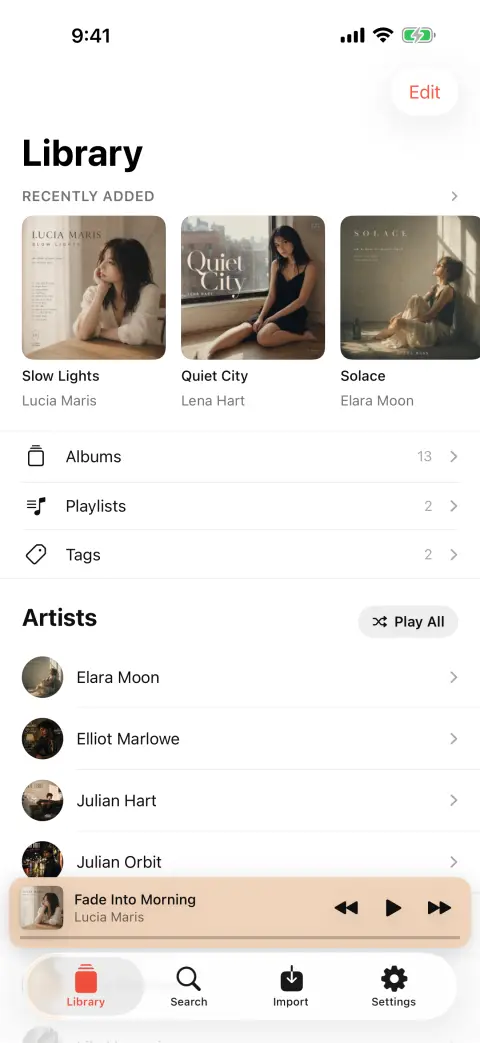
Albums, artists, songs and genres, plus Recently Added, Recently Played, Most Played and Liked Songs. Pin the shelves you use, hide the ones you do not.

  • Playlists you reorder by dragging, merged without loss when two devices both changed one
  • Tags that group whole albums, not just songs
  • Search across artists, albums and songs, and from the Home Screen
  • Edit details and write them back into the file, or fill the blanks from a lookup
The bMusic library screen, with albums, artists, playlists and recently added music

Listening

Gapless playback, EQ and practice tools

Gapless playback, an Up Next queue you can reorder, shuffle and repeat by song or by album, and everything the phone already knows how to do — lock screen, Control Center, headphone buttons, AirPlay and Bluetooth.

  • A ten-band equaliser, plus a correction curve for your own headphones
  • A karaoke mode that takes the voice out, and ±6 semitones that keep the tempo
  • Lyrics worked out on the phone, from the song itself
  • An A–B loop, 0.5–2× speed, volume levelling and a sleep timer
The bMusic player, showing cover art, the progress bar and playback controls

Yours

Optional iCloud sync — or stay fully local

Turn on iCloud sync and songs, artwork, playlists and play counts stay in step across your devices — through your account, not ours. Leave it off and the library never leaves the phone.

  • Yearly listening reports worked out on the device
  • Optional Last.fm scrobbling with your own account, queued through a flight
  • Siri, Shortcuts, Spotlight, CarPlay and a Home Screen widget
  • iPhone, iPad and Mac from one library, in 12 languages
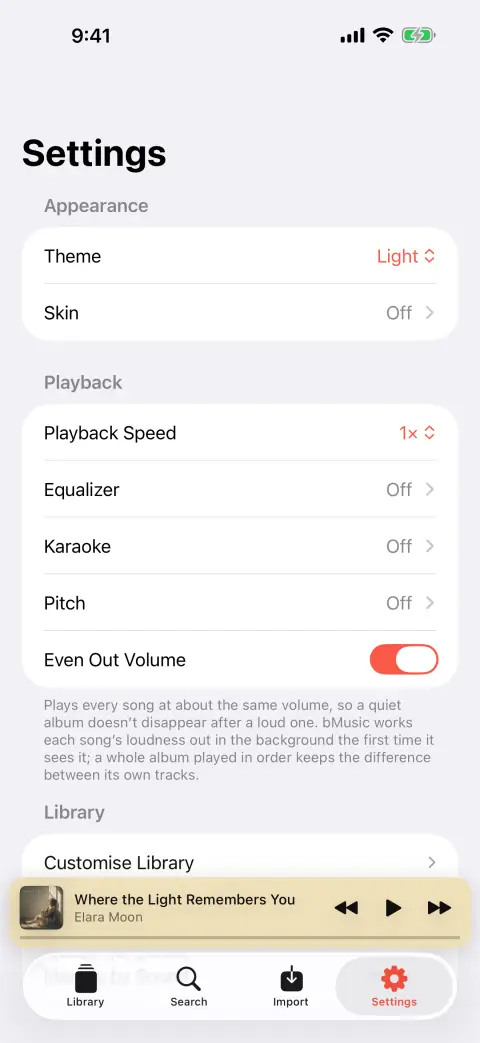
The bMusic settings screen, with playback, library and sync options

Advanced features

More than a basic offline player

On-device lyrics, vocal reduction, pitch control, A–B looping, two-way Wi-Fi transfer, tag editing and more — built around files you own.

The words, written down by the phone itself

Ask for lyrics and bMusic listens to the song and writes them out line by line, with the timing, using a speech model that runs on the device. The audio never leaves it. Correct any line by hand, or bring an .lrc you already have — bMusic reads those and the lyrics stored inside the tags too.
A practice room inside the player

A ten-band equaliser with a correction curve for your own headphones, a karaoke mode that pulls the voice out of the middle of the mix without hollowing out the bass, ±6 semitones that leave the tempo alone, an A–B loop, half to double speed, and a sing-along recording kept in time with the backing track.

Wi-Fi transfer that starts with a code, not an IP address

Open a page on the computer, point the phone’s camera at the code, and the browser is talking to the phone. It works in both directions — send an album across, or download one back — and it streams, so a 600 MB lossless record never has to fit in memory.

Your library, in your own iCloud

Songs, playlists, tags, likes, play counts, listening history, lyrics and equaliser curves stay in step through your own private iCloud database. There is no bMusic library server. Each device decides how much of the library it keeps on board, and the rest is one tap from playing.

Tags that end up inside the file

An edit is written back into the file itself — ID3 frames left intact, FLAC comment blocks replaced byte for byte. Fill blank fields from a lookup, name a song by letting the phone listen to it, trim on a waveform, split a long recording by its track list, or merge a box set that arrived as two albums.

iPhone, iPad, Mac, and the car

One library across a real iPad sidebar, a native Mac window with a floating desktop lyrics panel, and CarPlay with your own albums, tags and playlists. Siri, Shortcuts, Spotlight, a Home Screen widget and Last.fm scrobbling that survives a flight.

Why bMusic

Your files stay yours

bMusic is for music you already own. Keep the original files, play them without a connection, and move them back out whenever you want.

It lives on the device

Songs, artwork, playlists and play counts are stored in bMusic’s own folder on the phone. Turn the phone to aeroplane mode and nothing changes.

It plays the file, not a copy of it

A FLAC stays a FLAC. There is no import step that re-encodes your library into something smaller on the way in.

It asks for nothing

No account, no e-mail address, no library sitting on a server. Your songs, your artwork and your lyrics never leave the device at all.

Privacy

Your library is not uploaded to bMusic servers

bMusic has no user account and no cloud library of its own. Your audio stays on your devices unless you explicitly use an optional service such as your own iCloud sync or Last.fm.

  • Audio files, cover art and lyrics never leave the device
  • Play counts, listening history and the yearly report are worked out on the phone
  • iCloud sync, when you turn it on, goes through your own iCloud account
  • Wi-Fi transfer only ever hands over a private-range address and a device name, for ten minutes
  • What does go out is what you asked for: identifying a song sends a fingerprint rather than audio, looking up a cover sends a title, and scrobbling uses your own Last.fm account

The full policy is on the publisher’s site.

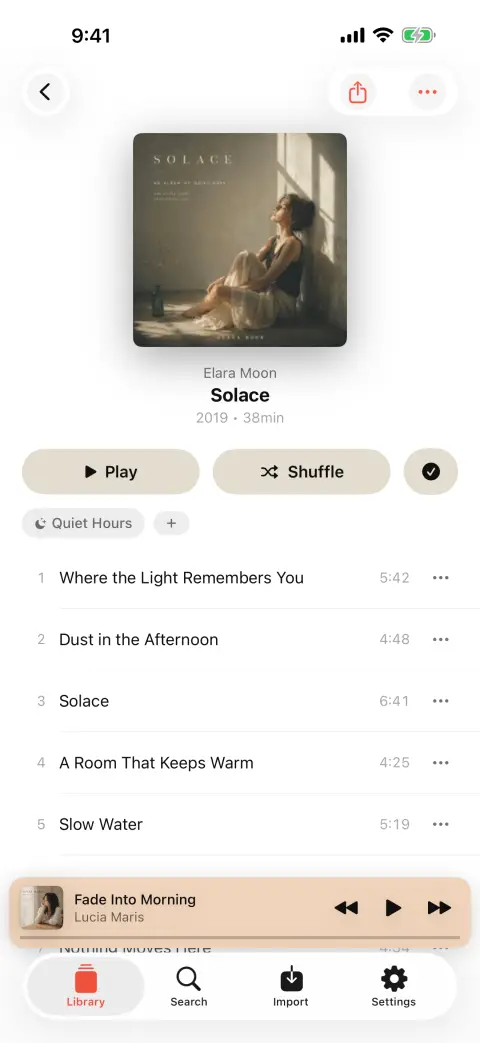
An album open in bMusic, showing its track list and cover art

Compared

What the other kinds of music app ask of you

Three shapes this category comes in, and what each one costs you in practice. No names — these are the patterns, not one particular app.

bMusic compared with the three common shapes of music app. ● does it · ○ partly, or only in some of them · · does not
What you getbMusicA streaming subscriptionA free player with adsA cloud-drive player
Plays music you own, with no signal at all YesNoYesPartly
Lossless FLAC and ALAC, tags and cover art included YesNoPartlyYes
No advertising anywhere in the app YesYesNoNo
Nothing to sign up for YesNoPartlyNo
Writes a song’s words down on the device, from the audio YesNoNoNo
Reads .lrc files and the lyrics stored in your tags YesNoPartlyPartly
Ten-band equaliser with a correction curve per headphone YesPartlyNoPartly
Karaoke: takes the voice out, and moves the key YesNoNoNo
A–B loop and 0.5–2× speed for learning a part YesNoPartlyPartly
Wi-Fi transfer both ways, nothing installed on the computer YesNoPartlyPartly
Syncs through your own cloud account rather than ours YesNoNoNo
iPhone, iPad, Mac and CarPlay from one library YesYesNoPartly

Every row is something bMusic does. Where bMusic is the one missing something another kind of app offers, that belongs in its issue tracker rather than in a table it wrote about itself.

Formats

It reads what you already have

Tags and cover art are read from every one of these, FLAC included — the thing most iPhone players quietly skip.

  • MP3
  • AAC
  • M4A
  • ALAC
  • FLAC
  • OPUS
  • WAV
  • AIFF
Requires
iOS 18.0 or iPadOS 18.0 and later. One app for iPhone and iPad, with a Mac app on the same library.
Formats
MP3, AAC, M4A, ALAC, FLAC, OPUS, WAV, AIFF.
Lossless
FLAC tags and embedded artwork are read by bMusic’s own parser, because the system frameworks do not offer them.
Interface
12 languages, following whatever the phone is set to.
Storage
Your files, in bMusic’s own folder — visible in the Files app, and downloadable back to a computer over the same Wi-Fi page.

FAQ

Questions people ask before downloading

Does the iPhone play FLAC?
It has been able to decode FLAC since iOS 11 — what it will not do is let you sync a FLAC through the Music app. A player that reads files instead of a synced library sidesteps that entirely, which is what bMusic is.
Do I need a computer?
Only if the files are on one. bMusic takes music from AirDrop, the Files app, another app’s share sheet, a direct link or your own WebDAV server, none of which involve a computer. If the files are on a computer, the Wi-Fi transfer page needs nothing installed on it beyond a browser.
Does it upload my music anywhere?
No. Importing writes into bMusic’s own folder on the device. The Wi-Fi transfer runs directly between your computer and your phone on your own network; our server only helps the two find each other and holds a private-range address for ten minutes.
Where do the lyrics come from?
From the song. A speech model runs on the phone and writes the words down with their timing, so nothing about the recording is uploaded to be looked up — which is also why it works for a live bootleg or a demo that is in no lyrics database at all. If you already have an .lrc file, or the words are sitting in the tags, bMusic reads those instead.
Can it really take the voice out of a song?
It cancels the middle of the stereo image between 150 Hz and 10 kHz, where a lead vocal usually sits, and leaves the kick and the bass alone. On a normally mixed stereo record the result is good enough to sing over; on a mono recording there is no middle to cancel, and bMusic says so rather than pretending. The key can be moved ±6 semitones without changing the tempo.
Will it replace Apple Music?
They are different things and they coexist happily. bMusic plays files you own; keep streaming for discovery if you like. Nothing bMusic does touches the Music app’s library.
Is there a Mac app, and is it the same library?
Yes to both. The Mac app is a native window — sidebar, song table, album grid, a Now Playing panel and a floating desktop lyrics window — and it shares the iPhone’s library through your own iCloud, so a song imported on one is on the other.
What happens to my library if I stop using bMusic?
Nothing. The files were always yours: they sit in bMusic’s folder, visible in the Files app, and the same Wi-Fi page you sent them in on will download any of them back to a computer. Nothing here is a one-way import.

Bring your own music

Every part of bMusic works for 15 days from the day you install it, with nothing held back. Send one album across and hear it on your own headphones.

iPhone, iPad and Mac · iOS 18.0 or later · MP3, AAC, M4A, ALAC, FLAC, OPUS, WAV, AIFF