How to get a CD you ripped onto your iPhone
You used EAC, XLD or dBpoweramp and you have a clean FLAC or ALAC rip with proper tags. Here is how it reaches the phone without a re-encode and without losing the disc layout.

Why the rip does not survive the usual route
Ripping properly takes effort: secure mode, AccurateRip, correct metadata, embedded art, disc numbers on a box set. The whole point is a copy that is exactly the disc. Then the file reaches iTunes or Finder and the first thing offered is a conversion, and on an Apple Music library there is a second risk — a track being matched to the catalogue version rather than kept as yours.
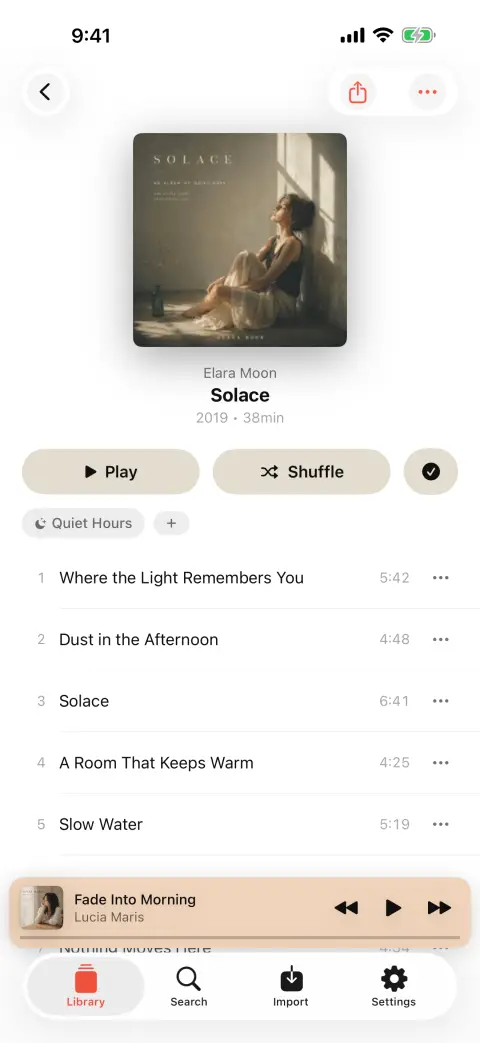
Multi-disc sets are where it usually goes wrong. A two-disc album often arrives as two folders, and a library that ignores disc numbers turns it into either one album with two track ones or two albums with the same name. Neither is what you ripped.
A player that reads your files avoids the whole class of problem. The rip goes onto the phone as it came off the disc; the tags in the file are the tags on the phone; and if the folders do need reconciling, that is a merge you do once, on the album, rather than a re-rip.
Step by step
From the disc to the phone
- 01
Rip to FLAC or ALAC — either is fine
Both are lossless and both play in bMusic with tags and art. FLAC is the better long-term archive because more software reads it; ALAC is worth choosing if the rest of your setup is already Apple. There is no reason to convert between them for this.
- 02
Get the tags right while you are still at the computer
Album artist on every track, disc numbers on a box set, and one piece of embedded art per album. Two minutes here saves a lot of scrolling later, and desktop tag editors are far quicker at it than any phone.
- 03
Send the album over Wi-Fi
Import from Wi-Fi on the phone, open the address it shows on the computer, read the code with the camera, and drag the album folder into the browser. The transfer is between your two machines on your own network — nothing to install, nothing uploaded.
- 04
Check the album landed as one album
bMusic files by tag, so a properly tagged two-disc set arrives as one album with its discs in order. If it did not — because the rip predates your tagging habits — merge the two halves in the app, or separate a compilation that grouped wrong.
- 05
Play it the way it was cut
Gapless playback matters more on a CD rip than anywhere else: a live record, a DJ mix or a classical work split into movements plays through without the pause that ruins it. Cover art missing on an old rip can be found from within the app.
Ripped straight to a NAS? bMusic can read from your own WebDAV server, so the album never has to touch a laptop at all.
What you keep
- The bit-perfect rip
- Nothing re-encodes on import. The FLAC or ALAC on the phone is byte-for-byte the file you made, so an AccurateRip-verified copy stays verified.
- Disc and track order
- Disc numbers are read and used, so a box set stays one album in the right order rather than becoming five albums with the same name.
- Your artwork
- Embedded art comes through. If an old rip has none, bMusic can find missing cover art and write the details back into the file.
- A way back off the phone
- The same Wi-Fi page lists the library and downloads any song back to a browser, so the phone copy is never the only copy you can reach.
FAQ
Ripped CDs on iPhone: the usual questions
FLAC or ALAC for an iPhone?
Does anything re-encode the file?
My box set is split across folders — can that be fixed?
Do I still need iTunes on the computer?
What about hi-res rips from vinyl or downloads?
Other guides
Play FLAC on an iPhone
The iPhone decodes FLAC and always has. Getting a FLAC file onto it is the part Apple never made easy.
Read the guideMove a library off Android
Switch to iOS moves your photos and messages. The folder of music files is the part it leaves behind.
Read the guideWhen streaming takes a song away
The album is greyed out and the playlist has a hole in it. Owning the file is the only fix that lasts.
Read the guideYour own music in the car
A tunnel, a data cap or a rural road, and the streaming app stalls. Files on the phone never do.
Read the guideLyrics for your own files
Lyrics apps look a song up in a catalogue. The rip, the bootleg and the demo are not in it — so the words have to come from the recording.
Read the guideKaraoke and practising a part
Take the voice out, move the key, loop the bar you keep missing and slow it down — on a song you own, on the phone.
Read the guideBring your own music
Every part of bMusic works for 15 days from the day you install it, with nothing held back. Send one album across and hear it on your own headphones.
iPhone, iPad and Mac · iOS 18.0 or later · MP3, AAC, M4A, ALAC, FLAC, OPUS, WAV, AIFF