Listening to your own music library in the car
Dead spots on the motorway, a data allowance you would rather spend elsewhere, and a streaming app that stops mid-chorus at the tunnel. Music files on the phone solve all three.

Why streaming is the wrong tool at 70 mph
A car is the worst environment a streaming app has to work in. Coverage drops in cuttings, tunnels, multi-storey car parks and most of the countryside; handover between masts stutters at speed; and a long drive on mobile data is a real slice of a monthly allowance. Offline downloads help, until the one album you wanted is the one that did not sync.
The other half of the problem is attention. Fiddling with a phone while driving is both dangerous and, in most places, illegal — so whatever plays needs to be set going before you move, and controllable from the wheel or the head unit after that.
Files on the phone answer both. There is nothing to fetch, so there is nothing to stall; and once playback has started, the car’s own controls drive it through the standard iOS media controls that every player uses.
Step by step
Setting up a drive
- 01
Put the albums you want on the phone
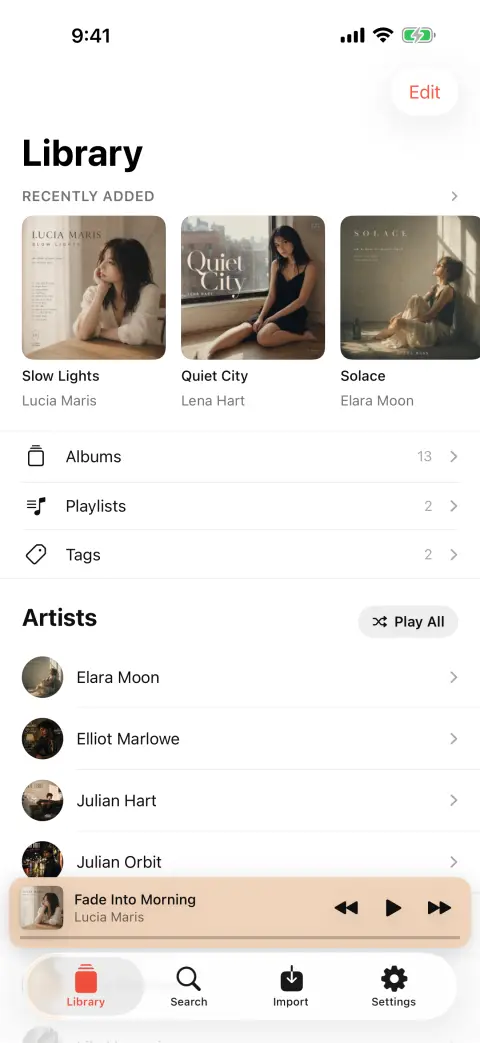
Install bMusic and send music over from your computer with Import from Wi-Fi: open the address the phone shows, read the code with the camera, drag the folders in. A long drive is a good excuse to bring the whole of something rather than the singles.
- 02
Build a playlist before you set off
Drag songs into a playlist, or use a Tag to group whole albums for a trip. Doing it stationary is the point — the aim is that nothing needs touching once the car is moving.
- 03
Connect the way your car connects
Bluetooth pairs to the phone and shows track details on most head units. A USB cable or the aux socket both work as well, and a cable keeps the phone charged, which a five-hour drive will want.
- 04
Start it, then use the car’s controls
bMusic plays through the standard iOS media controls, so the steering-wheel buttons, the head unit’s skip and pause, and the lock screen all drive it. Siri and Shortcuts work too.
- 05
Forget about signal for the rest of the drive
Nothing is being fetched, so nothing can stall. Aeroplane mode changes nothing about playback, and the phone uses noticeably less battery with the radio idle than it does streaming.
Set the queue before you drive and keep your hands on the wheel. Whatever the law where you are, a playlist chosen at a standstill is the only safe kind.
Why files win in a car
- No signal needed at all
- Tunnels, cuttings, underground car parks and empty motorway between towns. Playback does not know or care whether the phone has a bar.
- No data used
- A five-hour drive costs nothing from your allowance, and roaming abroad costs nothing either.
- Gapless where it matters
- A live album or a continuous mix plays without the silence a track boundary usually inserts — the difference is much more obvious in a car than on headphones.
- It resumes where you left it
- Get out for fuel, come back, and the album picks up where it stopped rather than restarting or losing its place.
FAQ
Music in the car: the usual questions
Does it work over Bluetooth?
What about USB or the aux socket?
Does playing music use mobile data?
Is there CarPlay support?
Will it drain the battery on a long drive?
Other guides
Play FLAC on an iPhone
The iPhone decodes FLAC and always has. Getting a FLAC file onto it is the part Apple never made easy.
Read the guideMove a library off Android
Switch to iOS moves your photos and messages. The folder of music files is the part it leaves behind.
Read the guidePut a ripped CD on an iPhone
You ripped it losslessly on purpose. Getting it onto the phone should not undo that.
Read the guideWhen streaming takes a song away
The album is greyed out and the playlist has a hole in it. Owning the file is the only fix that lasts.
Read the guideLyrics for your own files
Lyrics apps look a song up in a catalogue. The rip, the bootleg and the demo are not in it — so the words have to come from the recording.
Read the guideKaraoke and practising a part
Take the voice out, move the key, loop the bar you keep missing and slow it down — on a song you own, on the phone.
Read the guideBring your own music
Every part of bMusic works for 15 days from the day you install it, with nothing held back. Send one album across and hear it on your own headphones.
iPhone, iPad and Mac · iOS 18.0 or later · MP3, AAC, M4A, ALAC, FLAC, OPUS, WAV, AIFF